Introduction
In today’s digital world, managing documents efficiently has become an important part of personal and professional life. Whether you are a student completing an assignment, a business owner preparing contracts, an employee handling office paperwork, or a freelancer sending invoices, PDF files are widely used for sharing and storing information. They are convenient, professional, and compatible with different devices. However, editing PDF documents, filling out forms, adding signatures, and converting files can sometimes be challenging without the right software.
This is where pdfFiller comes in. It is an online PDF editor and document management platform designed to make working with digital documents easier. It provides various tools that allow users to edit PDFs, complete forms, add electronic signatures, convert files, organize pages, and share documents online.
Instead of using different applications for every document-related activity, users can access multiple PDF management features through one platform. This makes pdfFiller a convenient option for individuals and businesses that regularly work with digital paperwork.
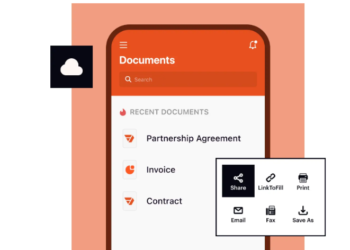
Another useful aspect of pdfFiller is its cloud-based functionality, which allows users to access and manage supported documents through compatible devices. Whether you are working from home, an office, or another location, the platform provides convenient access to document management tools.
In this article, we will explore pdfFiller, its important features, benefits, practical applications, and how it can help simplify everyday PDF management.
What Is PDFfiller?
PDFfiller is an online PDF editing and document management platform that allows users to create, edit, fill, sign, convert, and share PDF documents. It is designed to simplify document-related activities by providing several useful tools in one online workspace.
The platform helps users manage different types of paperwork without depending entirely on traditional desktop applications. Users can upload existing documents, make changes, add information, insert images, complete forms, and prepare files for electronic signatures.
One of the main advantages of pdfFiller is its collection of document management features. Whether someone needs to update a business agreement, complete an application form, combine multiple PDF files, or send a document for signing, the platform offers tools for these activities.
PDFfiller also supports document conversion, allowing users to work with different file formats. This can be useful when converting PDFs into editable Word documents or transforming other file types into PDF format.
Its cloud-based environment provides additional convenience for people who need to access their documents from different locations.
Overall, pdfFiller is designed to make digital paperwork easier to manage while supporting common document editing and sharing requirements.
Key Features of PDFfiller
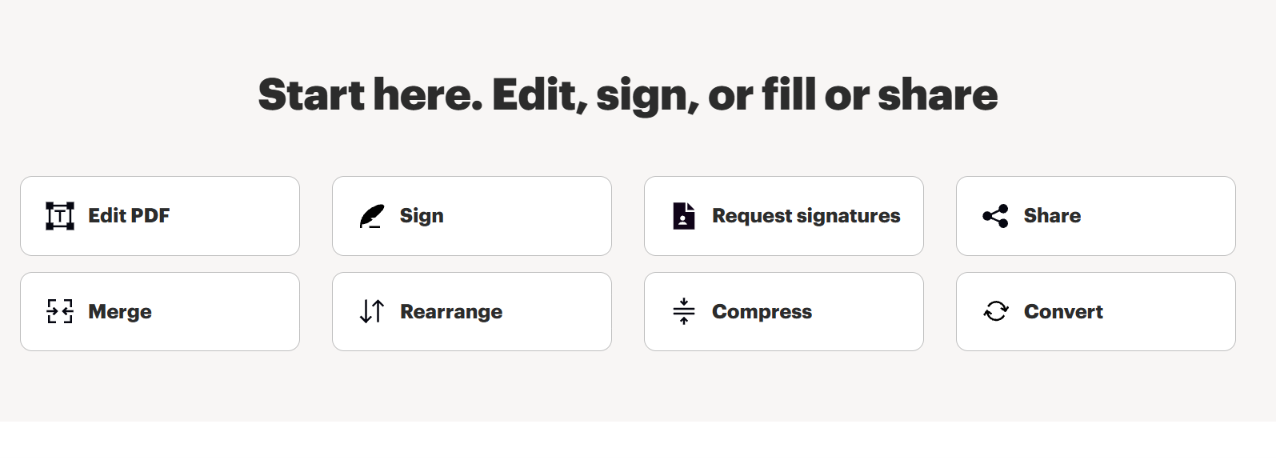
Online PDF Editing
Editing PDF documents is one of the most common requirements for students, employees, and business professionals. Sometimes, a document contains outdated information, spelling mistakes, incorrect dates, or details that need updating.
PDFfiller provides online editing tools that allow users to make changes directly to their PDF files.
Users can add text, insert images, highlight information, remove unwanted content, and make other adjustments depending on the document’s structure.
This feature is particularly useful when updating invoices, reports, agreements, application forms, and business documents.
For example, if you receive a PDF invoice with an incorrect address, you can use an appropriate editing tool to make the necessary changes instead of recreating the entire document.
Online PDF editing helps reduce repetitive work and makes document management more convenient.
Fill Out PDF Forms
PDF forms are commonly used by educational institutions, businesses, government departments, and other organizations.
These forms often require personal information, contact details, dates, addresses, and other important information.
PDFfiller provides tools that allow users to complete PDF forms digitally. Users can enter information into existing fields or add text to documents that do not contain interactive fields.
This can be useful for completing job applications, registration forms, customer information documents, educational applications, and business paperwork.
Digital form completion reduces the need to print documents, write information manually, scan completed forms, and send them through email.
It also makes paperwork easier to organize and share.
Electronic Signature Functionality
Electronic signatures have become increasingly important in modern business communication.
Contracts, agreements, invoices, permission forms, and authorization documents frequently require signatures before they can be finalized.
PDFfiller provides electronic signature functionality that allows users to sign PDF documents digitally and request signatures from other people.
This makes document approval more convenient because participants do not always need to print, sign, scan, and email physical paperwork.
For example, a freelancer can prepare a service agreement and send it to a client for an electronic signature.
Businesses can also use signature workflows to manage contracts and other documents that require approval.
Users should always verify applicable electronic signature laws and requirements before using digital signatures for important legal documents.
Convert PDF Files Into Different Formats
Sometimes, PDF documents need to be converted into other formats for editing, sharing, or presenting information.
For example, a user might receive a PDF report but need to make changes using Microsoft Word. Another person may want to transfer information from a PDF table into an Excel spreadsheet.
PDFfiller provides document conversion tools that support several popular formats.
Some useful conversion options include:
- PDF to Word.
- PDF to Excel.
- PDF to PowerPoint.
- PDF to JPEG.
- Word to PDF.
- Excel to PDF.
- PowerPoint to PDF.
- JPEG to PDF.
These tools can help students, office employees, freelancers, and business professionals work with different document types.
However, users should review converted files because complex layouts, fonts, images, and tables may not always transfer perfectly between formats.
Merge Multiple PDF Documents
Managing several PDF files can become confusing, particularly when documents belong to the same project or assignment.
For example, a business proposal may contain a cover page, financial report, supporting documents, and additional attachments stored separately.
PDFfiller offers a merging feature that allows users to combine multiple PDF files into a single document.
This makes document organization easier and reduces the number of separate files that need to be shared.
The feature can be useful for combining business reports, educational assignments, invoices, receipts, application documents, and scanned paperwork.
By bringing related information together, users can create organized documents that are easier to review and distribute.
Split PDF Documents
Sometimes, a PDF contains more information than you actually need.
For example, you might receive a large report but only need to share a few specific pages with a colleague.
PDFfiller provides PDF splitting tools that help users separate documents into smaller files.
This feature can be useful when working with large reports, contracts, educational materials, manuals, and business documents.
Instead of sharing an entire file, users can prepare smaller documents containing only the relevant information.
This can make document sharing more efficient and help recipients find important details quickly.
Compress PDF Files
Large PDF files can create problems when uploading documents to websites or attaching them to emails.
Some online services have file-size restrictions, while email platforms may limit the size of attachments.
PDFfiller provides PDF compression functionality that helps reduce document file sizes.
This makes files easier to upload, store, and share.
The compression feature can be particularly helpful when working with scanned documents, image-heavy reports, presentations, and large business files.
Users should always review compressed documents to ensure that images, text, and other important information remain clear and readable.
Create Fillable PDF Forms
Creating digital forms is another useful capability of pdfFiller.
Businesses and organizations frequently collect information from customers, employees, clients, and other individuals.
Instead of distributing traditional paper forms, organizations can create fillable PDF documents that allow people to enter information digitally.
PDFfiller provides form-building tools that let users add different types of fields to their documents.
These can include text fields, checkboxes, date fields, dropdown menus, and signature fields.
For example, a company can create an employee information form containing fields for names, addresses, contact details, and other necessary information.
Customers or employees can then complete the form digitally.
This can help standardize information collection and make administrative paperwork easier to manage.
Annotate and Highlight PDF Documents
Reading and reviewing PDF documents often involves highlighting important information and adding comments.
Students may want to highlight important paragraphs in their study materials, while professionals may need to provide feedback on business reports.
PDFfiller includes annotation tools that allow users to mark up their documents.
Depending on the available features, users can add highlights, comments, notes, arrows, shapes, and other visual elements.
These tools can make document reviews more organized.
For example, a manager reviewing a project proposal can highlight sections that require changes and add comments explaining the necessary revisions.
Students can also use highlighting tools to identify important information while studying.
Cloud-Based Document Management
Keeping digital documents organized is important for personal and professional productivity.
PDFfiller provides cloud-based document management functionality that allows users to store and access files through their accounts.
This can be useful when someone needs to work from different locations or devices.
Instead of depending entirely on documents stored on one computer, users can access supported files through their online workspace.
The platform also provides document-sharing and collaboration options that can help teams work with shared paperwork.
Users should follow appropriate security practices, including using strong passwords and carefully managing document-sharing permissions.
Benefits of Using PDFfiller
Saves Time and Improves Productivity
Traditional document management can involve printing, scanning, editing, and sending files through multiple applications.
PDFfiller brings several of these activities together in one platform.
Users can edit documents, complete forms, add signatures, and organize files without necessarily switching between different applications.
This can help reduce repetitive work and improve everyday productivity.
Convenient Online Access
Because pdfFiller is a cloud-based platform, users can access supported documents through compatible browsers and devices.
This is particularly helpful for remote employees, freelancers, students, and professionals who work from different locations.
Users can manage their paperwork without depending entirely on a single computer.
Reduces Paperwork
Printing physical documents for every small change or signature can consume time, paper, and other resources.
PDFfiller supports digital document editing, online form completion, and electronic signatures.
These features can reduce the need for traditional printing and scanning.
As a result, individuals and businesses can move toward more organized digital workflows.
Supports Business Productivity
Businesses regularly handle invoices, contracts, customer information, employee documents, and other administrative paperwork.
Managing these documents manually can consume valuable time.
PDFfiller provides tools that can help businesses edit documents, request signatures, create digital forms, and organize paperwork.
Its sharing and collaboration features can also support communication between team members and clients.
Multiple Tools in One Platform
One of the biggest advantages of pdfFiller is the availability of different document management features in one place.
Users can edit, convert, merge, split, compress, annotate, and sign documents through the platform.
This can reduce the need to search for separate applications for everyday PDF-related activities.
Supports Collaboration
Working with documents often involves multiple people.
PDFfiller offers document-sharing and collaboration functionality that can help users exchange documents and coordinate document-related activities.
This can be helpful for businesses and teams that regularly review, update, and approve paperwork.
Who Can Benefit From PDFfiller?
Students
Students frequently work with assignments, research papers, educational forms, and application documents.
PDFfiller can help them complete PDF forms, annotate study materials, convert documents, and organize assignments.
For example, a student can use the platform to fill out an application form or combine several PDF documents into one assignment file.
Teachers and Educational Institutions
Teachers regularly prepare educational materials, distribute forms, and review student documents.
PDFfiller’s editing, annotation, and form-building features can support these activities.
Educational institutions can also use digital forms to collect information from students and parents.
Small Business Owners
Small businesses often deal with invoices, agreements, customer information, employee records, and other administrative documents.
PDFfiller provides tools that can help business owners edit documents, request signatures, organize paperwork, and create digital forms.
These capabilities can support more efficient document workflows.
Freelancers
Freelancers regularly send proposals, invoices, agreements, and project-related documents to clients.
PDFfiller can help them prepare professional documents and manage signature requests.
For example, a freelancer can prepare a service agreement, add the necessary information, and send it to a client for signing.
Human Resources Professionals
Human resources departments handle employee applications, offer letters, employment agreements, onboarding forms, and other documents.
PDFfiller’s form-building and electronic signature features can help organize these processes.
Digital document workflows may also reduce the amount of manual paperwork involved in employee administration.
Healthcare Organizations
Healthcare organizations regularly handle patient forms, administrative documents, and other paperwork.
Digital forms can make information collection more convenient.
However, healthcare professionals should carefully verify applicable privacy requirements, account configurations, and compliance obligations before using any online platform for sensitive patient information.
Real Estate Professionals
Real estate agents and property managers frequently work with agreements, applications, contracts, and other property-related documents.
PDFfiller can help them prepare, edit, and share PDF paperwork.
Its electronic signature functionality can also support document approval workflows.
How PDFfiller Simplifies Personal and Professional Document Management
PDFfiller offers flexibility for different document management situations.
For personal use, individuals may need to complete application forms, sign documents, organize personal records, or convert files.
For professional use, businesses may need more structured workflows involving multiple users, shared documents, reusable templates, and signature requests.
The platform provides tools that address many of these requirements.
For example, someone applying for a new job might use pdfFiller to complete an application form and sign the required documents.
A business professional might use it to update an agreement, send it for approval, and maintain an organized digital copy.
This flexibility makes pdfFiller relevant to people with different levels of document management experience.
Is PDFfiller Easy to Use?
Ease of use is an important consideration when selecting an online PDF editor.
A document management platform should make everyday tasks understandable without requiring advanced technical knowledge.
PDFfiller provides an online workspace with tools for editing, signing, converting, organizing, and sharing documents.
Users can upload their files, select the required feature, make changes, and save or share the results.
People familiar with basic computer operations should generally find the workflow approachable.
However, the experience may depend on the complexity of the document and the specific task.
For example, adding a simple signature is different from editing a complicated PDF containing multiple tables, images, and specialized formatting.
New users may benefit from exploring the available tools before working with important documents.
Security and Privacy Considerations
Document security is an important consideration when using any online PDF editor.
PDF files may contain personal information, financial records, business agreements, customer details, and other sensitive data.
Therefore, users should understand the security practices of the platform they choose.
PDFfiller provides security-related features and describes its data protection and compliance measures on its official website.
Users should also follow responsible document management practices.
Some useful recommendations include:
- Use a strong and unique account password.
- Avoid sharing login credentials.
- Review document-sharing permissions.
- Do not publicly share confidential documents.
- Use password protection when appropriate.
- Avoid uploading sensitive information unless the platform and account configuration meet your requirements.
- Remove unnecessary access when documents are no longer being shared.
- Review applicable privacy and compliance requirements.
Businesses handling confidential information should carefully evaluate their legal and organizational obligations before adopting an online document management service.
Things to Consider Before Using PDFfiller
Pricing and Subscription Plans
Users should review the available pricing options before subscribing.
Some tools and services may require a paid subscription, and feature availability can depend on the selected plan.
It is also important to check billing terms, renewal conditions, and cancellation policies.
Internet Connection
Because pdfFiller is an online platform, an internet connection is generally required to access its cloud-based functionality.
Users who frequently work without internet access should consider this limitation.
Document Formatting
PDF documents can contain complicated layouts, fonts, tables, and images.
Although editing tools can simplify document changes, some formatting adjustments may still require additional attention.
Always review the final document before sharing or submitting it.
File Compatibility
Check whether your document format and file size are supported before uploading.
Different tools may have different file requirements.
Privacy Requirements
Before uploading confidential documents, review the platform’s privacy and security information.
This is particularly important for organizations handling financial, legal, healthcare, or customer-related information.
Why Choose PDFfiller for Online Document Management?
Managing documents efficiently is becoming increasingly important as more individuals and organizations move toward digital workflows.
PDFfiller brings several useful document management features together, making it a practical option for people who regularly work with PDF files.
Its online editing functionality helps users update documents without rebuilding them from scratch.
Its form-filling tools support digital paperwork, while electronic signatures make it easier to prepare documents for approval.
Conversion features provide flexibility when working with different file formats, and document organization tools help users manage multiple PDF files.
Another important advantage is that users can access different document-related tools through one online platform.
Rather than searching for a separate application every time they need to merge, split, compress, or sign a document, they can explore the available features within pdfFiller.
For individuals, this can simplify everyday paperwork.
For businesses, it can support more organized document workflows and collaboration.
The best choice ultimately depends on your specific needs, budget, document volume, security requirements, and preferred working environment.